Vitalism isn't just a philosophy; it's a way of life. Living vitalistically means that you must consciously consider everything that you ingest, whether it's a food or a thought. Everything you put into your mind and body ... affects the body
Showing posts with label posture. Show all posts

Monday, September 5, 2011

I'm left handed now!


It only took 40 years but I've gone left handed.

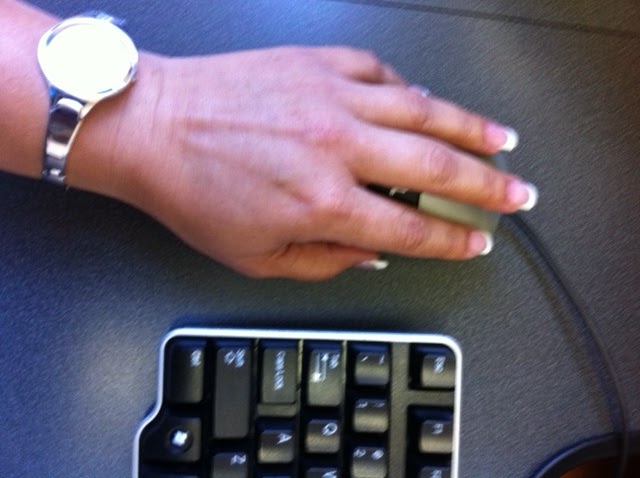
Using a mouse that is, for all else I still use my right hand predominately.The change was amazing and by balancing the body in this one area, it had a ripple effect every where else. My neck and shoulder stress has diminished, the subluxations in this area were significantly less. My overall posture at the computer ( where I've been spending more and more time) has improved and relaxed.

Let me take you back over 18 months now. My desk has always been ergonomically sound, we took great care when setting up the office to look at such issues. A few years ago we had chairs specifically built for us. I can tell if someone has changed chairs with mine and if they have changed the settings :) But longer hours spend typing away, like I am now meant that on top of my daily adjusting patients, my wrists were causing me great concern.

Looking after my patients is my joy, so my only thought was to look outside of the box to a solution. My right hand and my work were one and the same. Then the thought came to me that my left hand was capable, just untrained and it could be put to good use, after all plenty of people had probably made the same changes after injury and illness.

The first month was all about giving my left hand an experience of using the mouse. Yes it felt strange at first. I played solitaire on the computer to help with general mouse movement, while it went a long way to help my control it did little for my scores. Then I progressed to reading my emails and generally using it to surf, with each of these activities I worked mainly in the less busy times of the day. Interval training helped me to lighten the load away from my right hand and not over burden the left at the same time.

Slowly but surely I picked up speed in the second months and by months end I knew I had reached a milestone when I went to use another computer in the office and searched for the mouse with my left hand. Strength and speed have increased with time and I still focus on my posture. My next venture is getting used to my saddle seat at home. But that's another story for another time. For now I balance my load of work with both hands and exercise my wrists and hands along with regular adjustments.

Please note these exercise may not be for everyone, please check with your Chiropractor if they would recommend them specifically you. Remember to take care not to force your hands or wrists and please take your time.

Stretch Out.- We are constantly gripping things with our hands. The pen we write with, the door handle we open the door with, even using the keyboard to strike the keys with is a partial gripping action. While a stress ball feels great at times, again its a gripping action at work. Balancing what the hands do, will mean we should stretch out the whole hand.

  • Step 1, place your hands palm side down on a flat surface and relax your wrists. 
  • Step 2, gently spread your fingers apart and hold them for a count of 5.
  • Step 3. repeat for 3 to 5 times.


Stretch back - Now that your fingers are gently warmed up, try the next stretch to get that extra flexibility going.

  • Step 1. from the relaxed position in Stretch out, lift just your fingers off the flat surface. Try to keep the palm of your hand on the flat surface and still. Hold this for a count of 5 or less if this it too much for the first time. Slowly build up to it, there is no use over doing it at the beginning.

  • Step 2, repeat for 3 to 5 times.


Make a Fist - After you have exercised in one direction its now time to do the other direction.
  • Step 1, from the relaxed position in Stretch out, make a gentle fist with your hands. Again hold for a count of 5 or what ever you are first capable of.

  • Step 2, repeat for 3 to 5 times.


Wrist moves - Moving up from the hands, its now time to move those wrists. Gentle! Please be aware that forcing any of these moves is NOT what these exercises are about, you are just after a gentle stretch pressure. If any of these hurts please stop and discuss your difficulties with your Chiropractor.
  • Step 1, from the relaxed position, bend one or both your wrists at the same time UP and hold for a count of 5 or as what ever you are capable of. Then rest your whole hand flat.

  • Step 2, lift your whole lower arm off the flat surface, keeping as horizontal as possible and bend down at the wrist. Hold for a count of 5. Rest once you have done that.

  • Step 3, repeat for 3 to 5 times in both directions. Alternately you can do this exercise with both hands together for light or greater resistance.


Wednesday, November 3, 2010

Is your teenager doing exams?

The season for exams is fast approaching. Our year 12 students will soon sit their last exams and parents nation wide will be left wondering and agonising over their children's health and well being.

Are they getting enough sleep?
Are they getting enough exercise, what about their diet.
Could they change their study posture?

A word of gentle advise – don’t try anything too drastic at this time. Definitely support them in their efforts, but if its not something they are already used to, doing it now might be more harmful. Cover the basics of sleep, exercise, nutrition and good spinal health.

If their normal out of exam node sleep pattern is maintained or closely followed that should help to carry them through. Forcing them to get more sleep may just prove to be a waste of time. Sure they need their sleep, but just like when they were toddlers if they didn’t want to go for a nap, they won’t. Encourage them to take breaks from their studying. Eating smaller meals more often might help with maintaining their energy levels and certainly encourage their intake of water. Maintain their regular spinal adjustments.


For their nerves and stress levels - I have to quote my own Mum here. She would see me getting all bent out of shape about something and it would detract me from my task of studying so she would say " Ok sit and worry for 10 minutes, then get back to work".

Get it out of your system and then move on.


Good luck to all those in exams.


Monday, November 1, 2010

Do you want to carry LESS weight on your shoulders?

For every inch of Forward Head Posture, it can increase the weight of the head on the spine by an additional 10 pounds.” -Kapandji, Physiology of Joints, Vol. 3


To convert that to metric for you, the average head is 12lbs or 5.44 kgs, if you slouch forward one inch or 2.54 cm your shoulders are now wearing 14.51 kgs. Move it forward some more (another inch/2.54cm) and it now puts 19 kgs of weight on your spine at the junction of your shoulders. 


For every centimetre you move forward another 1.78kg of weight is felt by your spine.


In the long term this puts your neck under so much stress that the vertebrae themselves will change structurally due to the stress. Wear the weight over your shoulders as you were designed to and less weight will be experienced by your spine.

Monday, October 11, 2010

Straighten Up Australia

If you're looking for a daily stretching program that enables you to get that overall stretch happening - then Straighten Up is for you. Designed by Ron Kirk of Life University, this program is being used to promote spinal health throughout the USA.

During my studies at Life Uni, Ron was a keen advocate of daily spinal health. We as students all took his spinal health care classes as part of our curriculum. This routine takes 3 minutes to complete, does not need fancy special equipment and can and should be done easily at home.

Done routinely, these Straighten Up exercises focus on getting your body ready for the day ahead. They can be done before your day even commences or even in a break during the day. Theses exercises form a great platform for an active healthy lifestyle.


For how to do these exercises click on this link. Straighten Up


Please note : Check with your Chiropractor or other healthcare professional before starting "Straighten Up" to make sure these exercises are appropriate for your specific needs.

Monday, September 20, 2010

Work smarter not harder

Have you often looked at just what your doing whether its how you sit at your desk or how you walk and really thought about the actual movement itself. Could you be doing the same thing day in day out just because that's the way you've always been doing it? It might be time to look at things from a different perspective and look at doing it smarter not harder. A small adjustment in the "how" might lead to long term better posture and muscle tone, let alone not causing you any amount of pain.

Take for example the example of sitting at your desk. Been doing that for ages? Spend alot of time at the keyboard tapping away and then using the mouse with a death grip? How about changing hands to use the mouse? Do you think your other hand is totally useless, that it would be too hard, that you wouldn't be able to work as fast? Well lets think about that, just how fast were you when you first started to use the computer, how dexterous were you. It's all a matter of training. Start with those activities that you can take your time on - maybe reading through your emails and get the hang of just scrolling with the mouse in the other hand. Then add another activity every other day as you get used to things, switching back as you lose correct form. Remember you want to work smarter not harder.

Then as you build up strength and speed you can increase the amount of time that you spend with the mouse in the other hand. Your dominant hand does a fair more work than the other hand does, so sharing the load helps reduce the overloading and provides you with a chance to do things differently and correct long standing poor habits.

Tuesday, August 10, 2010

Homework


As a student I loathed it.

As a teacher I gave it out in bucket loads.


Now as a parent I’m the supervisor of making sure it all gets done.

But as a Chiropractor I’m very interested in how it gets done and where.

I’ve seen homework done on the floor in front of the TV. On their lap (again in front of the TV), sitting on their bed, on the school bus and even on the way to school in the car. None of which are any good as far as posture is concerned.

Any chance of concentrating at the task at hand is severely diminished if the body has to do two things at once. Concentrating on the homework is best achieved if you’re sitting at your desk or a similar table – like the kitchen table. Much like the recommendations for office ergonomics, the students work environment should have the basics.

The desk or table for them to study at that has enough space for the student to write on and have a few books open. Writing space must be directly in front of the student. If the space is also shared with a computer, then the keyboard should be able to be moved from its central position to be then out of the way. Thus making sure the student has enough space directly in front of them when writing.

A students chair should have the ability to change the overall height of the chair, the base to be tilted and the back rest to be moved up or down. This allows the students posture to be maintained per the individuals needs. One size does NOT fit all. When seated the students should sit into the back of the chair. There should be a gap between the base of the chair and their calf. The base should allow for the hip and knee to be level or even the knee lower than the hip (this promotes a more upright posture). The back of the chair should extend up to the shoulder blades.

Some students may also require a foot rest. Especially for upper school students who spend long hours at their desk, the use of the foot rest helps to remove the stress/ fatigue from their legs and enables them to keep their correct posture for longer.

If a computer is used (more often than not these days they are.) I do recommend the use of a desk top variety. That way the correct seated posture can be easily maintained. If a laptop is used at home, using a separate keyboard and mouse makes the students work environment ergonomically sound. Then they are able to raise the laptop screen to a higher level and use the attached keyboard lower down.

A document holder placed on either side of the screen at the same level of the screen is a great idea. That way notes can be transcribed easily looking either left or right of the screen instead of looking down at the desk.

And last but not least, making sure that they take regular breaks. This helps the brain and the body from becoming fatigued.